---
title: Tesla Walkthrough Videos
description: This knowledge base article explains where to find the OBD port in different Tesla models and how to connect the adaptor.
---
[Submit a Support Request](https://support.lyteflo.com/kb-tickets/new?hsLang=en-us) [Lyteflo Portal](https://app.lyteflo.com/battery-reports)
[Skip to content](https://support.lyteflo.com/where-can-i-find-the-obd-port-in-a-tesla-and-how-do-i-connect-the-adaptor#main-content)
English - United States
Show submenu for translations
[Submit a Support Request](https://support.lyteflo.com/kb-tickets/new?hsLang=en-us)
[](https://support.lyteflo.com/?hsLang=en-us)
Open main navigation
Close main navigation
- English - United States
Show submenu for translations
- [Submit a Support Request](https://support.lyteflo.com/kb-tickets/new)
- [Lyteflo Portal](https://app.lyteflo.com/battery-reports)
[Lyteflo Portal](https://app.lyteflo.com/battery-reports)
How can we help?
- There are no suggestions because the search field is empty.
1. [Lyteflo Knowledge Base](https://support.lyteflo.com/?hsLang=en-us)
2. [Tesla Walkthrough Videos](https://support.lyteflo.com/tesla-walkthrough-videos?hsLang=en-us)
# Tesla Walkthrough Videos
With Tesla vehicles, you will need to remove a plastic trim panel to locate the OBD diagnostic port. Then you can connect an adaptor cable and plug in the Lyteflo device. The adaptor cables are labelled.
**Below you will find a list of OBD port locations and walkthrough videos for different Tesla models.**
### **Jump to:**
[**Model 3 (2018)**](https://support.lyteflo.com/where-can-i-find-the-obd-port-in-a-tesla-and-how-do-i-connect-the-adaptor#Model_3_2018)
[**Model 3 (2019-2023)**](https://support.lyteflo.com/where-can-i-find-the-obd-port-in-a-tesla-and-how-do-i-connect-the-adaptor#Model_3_2019-2023)
[**Model 3 (2024+)**](https://support.lyteflo.com/where-can-i-find-the-obd-port-in-a-tesla-and-how-do-i-connect-the-adaptor#Model_3_Highland_2023plus)
[**Model Y (2020-2024)**](https://support.lyteflo.com/where-can-i-find-the-obd-port-in-a-tesla-and-how-do-i-connect-the-adaptor#Model_Y_2020-2024)
**[Model Y (2025+)](https://support.lyteflo.com/where-can-i-find-the-obd-port-in-a-tesla-and-how-do-i-connect-the-adaptor#Model_Y_Juniper_2024plus)**
**[Model S & Model X (2016-2020)](https://support.lyteflo.com/where-can-i-find-the-obd-port-in-a-tesla-and-how-do-i-connect-the-adaptor#Model_S_Model_X_2015-2020)**
**[Model S & Model X (2021+)](https://support.lyteflo.com/where-can-i-find-the-obd-port-in-a-tesla-and-how-do-i-connect-the-adaptor#Model_S_Model_X_2021-2025)**
### **Model 3 (2018)**
**OBD Port Location:** Under the rear passenger AC vent in the center console.
**Demo Video:**
*Note: The video below mentions 2019-2024. The 2018 Model 3's port is in the same location, it just uses a different adaptor cable.*
### **Model 3 (2019-2023)**
**OBD Port Location:** Under the rear passenger AC vent in the center console.
**Demo Video:**
### **Model 3 (2024+)**
**OBD Port Location:** Near passenger side door panel.
**Demo Video:**
****
### **Model Y (2020-2024)**
**OBD Port Location:** Under the rear passenger AC vent in the center console.
**Demo Video:**
### **Model Y (2025+)**
*\*Note: If your 2025 Model Y was built late in 2024 or early in 2025 ("pre-refresh"), please follow the instructions for [Model Y 2020-2024](https://support.lyteflo.com/where-can-i-find-the-obd-port-in-a-tesla-and-how-do-i-connect-the-adaptor#Model_Y_2020-2024).*
**OBD Port Location:** Near passenger side door panel.
**Demo Video:**
### **Model S & X (2016-2020)**
**OBD Port Location:** Under the main display screen in the center console, there is a small shelf that can be removed by pushing down.
**Demo Video:**
With Tesla vehicles, you will need to remove a plastic trim panel to locate the OBD diagnostic port. Then you can connect an adaptor which will allow you to plug in the Lyteflo device. The adaptor cables are labelled.
### **Model S & X (2021+)**
\*Note: Some 2021 Model S & X that were built early in the year of 2021 will look like the pre-2021 vehicles and you should follow the instructions for [Model S & X 2016-2020](https://support.lyteflo.com/where-can-i-find-the-obd-port-in-a-tesla-and-how-do-i-connect-the-adaptor#Model_S_Model_X_2015-2020).
**OBD Port Location:** Under the center console display screen behind a small panel.
**Demo Videos:**
**Step 1 -** Remove the panel.
**Step 2 -** Rotate or pop out the blue connector on the right to free up space to plug in the adaptor cable. (Don't worry, it will pop back in after).
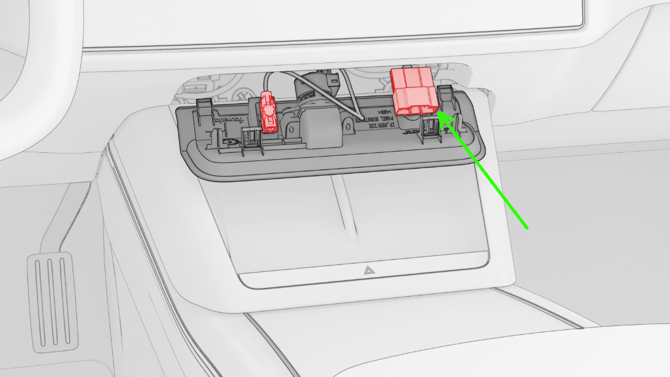
**Step 3 -** Connect your adaptor cable, then you're ready to scan!
- [Supported Vehicles List: Battery Certificates](https://support.lyteflo.com/supported-vehicles-list-battery-certificates?hsLang=en-us)
- [Tesla Walkthrough Videos](https://support.lyteflo.com/tesla-walkthrough-videos?hsLang=en-us)
- [Getting Started with Battery Certificates](https://support.lyteflo.com/getting-started-with-battery-certificates?hsLang=en-us)
- [Features](https://support.lyteflo.com/features?hsLang=en-us#main-content)
- [EV Sales Hub](https://support.lyteflo.com/features?hsLang=en-us#ev-sales-hub)
- [FAQs](https://support.lyteflo.com/faqs?hsLang=en-us#main-content)
- [Battery Certificates](https://support.lyteflo.com/faqs?hsLang=en-us#battery-certificates)
- [EV Sales Hub](https://support.lyteflo.com/faqs?hsLang=en-us#ev-sales-hub)
- [Learn More](https://support.lyteflo.com/learn-more?hsLang=en-us#main-content)
- [Tips & Tricks](https://support.lyteflo.com/learn-more?hsLang=en-us#tips-tricks)
- [Troubleshooting](https://support.lyteflo.com/troubleshooting?hsLang=en-us#main-content)
- [EV Sales Hub](https://support.lyteflo.com/troubleshooting?hsLang=en-us#ev-sales-hub)
- [Battery Certificates](https://support.lyteflo.com/troubleshooting?hsLang=en-us#battery-certificates)
- [Account & Billing](https://support.lyteflo.com/account-billing?hsLang=en-us)
Copyright © 2026, Lyteflo Inc.
```json
{
"@context" : "https://schema.org",
"@type" : "VideoObject",
"contentUrl" : "https://46587111.fs1.hubspotusercontent-na1.net/hubfs/46587111/video_assets/208444223894/inherited/web_optimized.mp4",
"dateModified" : "2026-02-27T14:42:37.309Z",
"duration" : "PT3M6S",
"height" : 1080,
"name" : "LYTEFLO EXPLAINER VIDEO - FEB 26",
"thumbnailUrl" : "https://46587111.fs1.hubspotusercontent-na1.net/hubfs/46587111/LYTEFLO%20EXPLAINER%20VIDEO%20-%20FEB%2026.mp4/medium.jpg",
"uploadDate" : "2026-02-27T14:42:22.508Z",
"width" : 1920
}
```
```json
{
"@context" : "https://schema.org",
"@type" : "VideoObject",
"contentUrl" : "https://46587111.fs1.hubspotusercontent-na1.net/hubfs/46587111/video_assets/214711784082/inherited/web_optimized.mp4",
"dateModified" : "2026-06-09T21:34:27.695Z",
"duration" : "PT53S",
"height" : 1080,
"name" : "Tesla Model S years 2016-2021",
"thumbnailUrl" : "https://46587111.fs1.hubspotusercontent-na1.net/hubfs/46587111/Tesla%20Model%20S%20years%202016-2021.mp4/medium.jpg",
"uploadDate" : "2026-06-09T21:32:26.733Z",
"width" : 1920
}
```
```json
{
"@context" : "https://schema.org",
"@type" : "VideoObject",
"contentUrl" : "https://46587111.fs1.hubspotusercontent-na1.net/hubfs/46587111/video_assets/216915334186/inherited/web_optimized.mp4",
"dateModified" : "2026-07-10T20:50:55.396Z",
"duration" : "PT7S",
"height" : 640,
"name" : "videoplayback copy",
"thumbnailUrl" : "https://46587111.fs1.hubspotusercontent-na1.net/hubfs/46587111/videoplayback%20copy.mov/medium.jpg",
"uploadDate" : "2026-07-10T20:50:55.394Z",
"width" : 360
}
```
```json
{
"@context" : "https://schema.org",
"@type" : "VideoObject",
"contentUrl" : "https://46587111.fs1.hubspotusercontent-na1.net/hubfs/46587111/video_assets/216915293260/inherited/web_optimized.mp4",
"dateModified" : "2026-07-10T21:51:20.940Z",
"duration" : "PT7S",
"height" : 720,
"name" : "Diagnostic port location on a refreshed model s x Tesla plaid. - Tesla Mike (720p, h264)",
"thumbnailUrl" : "https://46587111.fs1.hubspotusercontent-na1.net/hubfs/46587111/Diagnostic%20port%20location%20on%20a%20refreshed%20model%20s%20x%20Tesla%20plaid.%20-%20Tesla%20Mike%20(720p%2c%20h264).mov/medium.jpg",
"uploadDate" : "2026-07-10T21:51:20.938Z",
"width" : 1280
}
```