
Here is a summary of the LED lights on the device and a video of a vehicle being scanned.
When you first plug the device into a vehicle the green power LED lights up to indicate that the device is powered on:
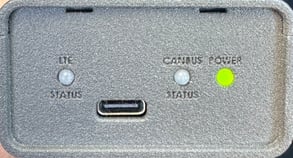
You will immediately the LTE / Status light will flash green as the device connects to the LTE network, then flash blue when connected to LTE and communicating with the vehicle.
You will see a solid green light when the scan is complete and successful.
You will see a flashing orange light if user input is needed in the app (for example inputing the VIN if the device cannot detect it, or selecting the trim level).
You will see a solid red light when the scan is complete but was unsuccessful.
If you see a solid red light, please ensure the vehicle is on then retry the scan by unplugging and replugging the device.
Here is a video showing the status lights in a typical scan that is successful: